
Let's cut right to it: the single most important rule for eBay auctions is making sure they end when your buyers are actually online and ready to bid. After years of selling, I can tell you the undisputed sweet spot is Sunday evening, somewhere between 6 PM and 10 PM. Timing your auction to close in this window taps into weekend downtime and the psychology of last-minute bidding, which almost always pushes that final sale price higher.
The Psychology Behind Peak Bidding Times
Here’s a little secret: timing your auction has less to do with when you list it and everything to do with when it ends. The whole game is about manufacturing a sense of urgency and competition right when the maximum number of eyeballs are on your item. You want to align those final, frantic moments with the natural rhythm of your buyers' lives.
Take a second and picture your ideal customer. When are they kicking back and browsing eBay? It’s probably not at 9 AM on a Tuesday. It's more likely after dinner, during a lazy weekend afternoon, or while they're scrolling on the couch before bed. This simple insight is exactly why Sunday evening is pure gold for sellers.
The Sunday Evening Sweet Spot
Sunday night is, without a doubt, the heavyweight champion for ending eBay auctions. Most people are home after a busy weekend, feeling relaxed, and in the perfect mindset to do some online shopping. You even get a little boost from the "Sunday scaries"—that pre-workweek dread that often leads to a bit of retail therapy.
By scheduling your auctions to wrap up in that 6 PM to 10 PM window, you’re putting your item in front of a huge, engaged audience that is actively looking to buy. More traffic means more watchers, which leads to more last-minute bids and, ultimately, a better final price. It's a simple and powerful formula.
This chart gives you a quick visual breakdown of how bidding activity generally stacks up throughout the week.
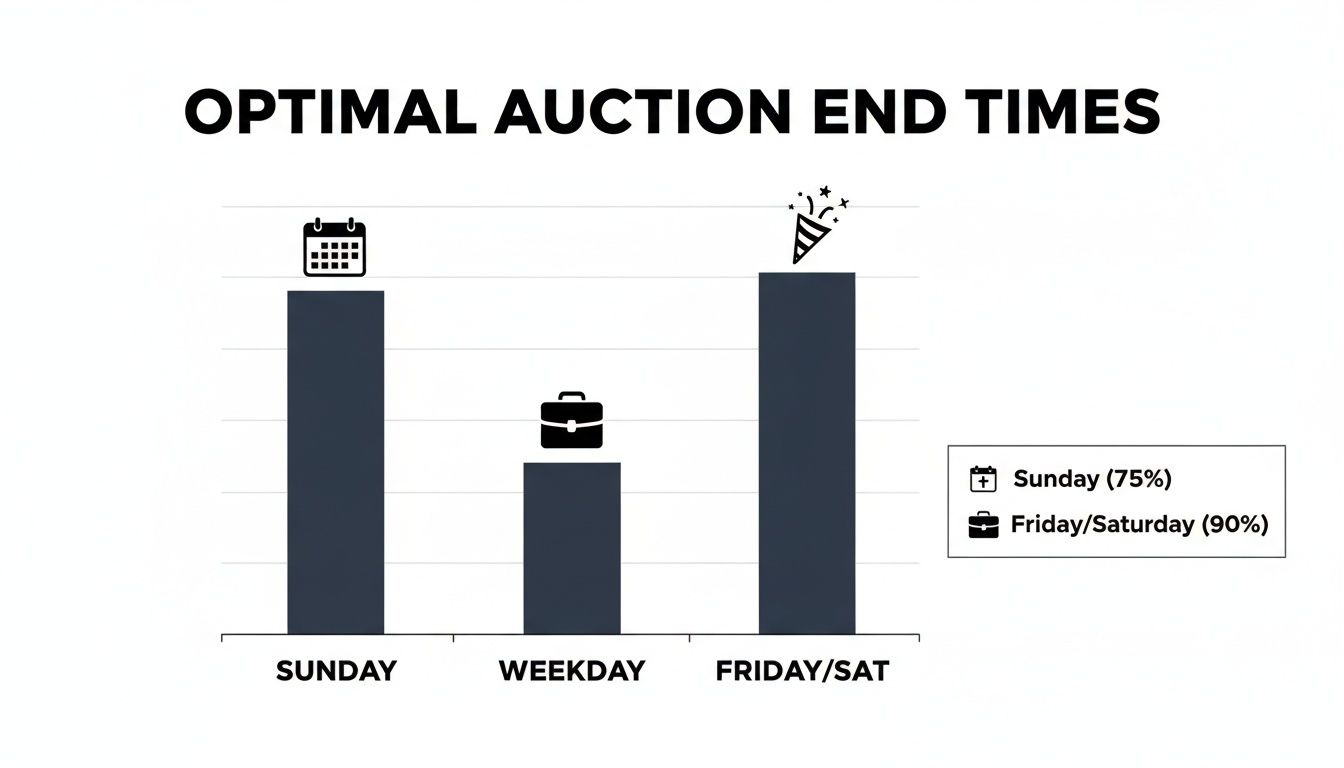
As you can see, Sunday evening delivers a potent mix of high user traffic and serious buying intent. This makes it the go-to slot for most of your auction-style listings.
To make this even easier, here’s a quick-reference guide ranking the best days and times to schedule your eBay auction endings, based on typical user activity and bidding patterns.
eBay Auction End Times Ranked by Bidding Activity
| Rank | Day of the Week | Optimal End Time Window (Local Time) | Reasoning |
|---|---|---|---|
| 1 | Sunday | 6 PM – 10 PM | The absolute peak for traffic. Buyers are relaxed, at home, and ready to bid before the work week begins. |
| 2 | Monday – Thursday | 7 PM – 10 PM | Strong, consistent traffic from people unwinding after work and dinner. A solid alternative to Sundays. |
| 3 | Saturday | 11 AM – 4 PM | Decent for daytime browsing, but evenings are a dead zone as people are often out. |
| 4 | Friday | Avoid Evenings | Generally the worst evening for auctions. People are commuting, going out, or starting their weekend away from their screens. |
| 5 | Weekdays | Avoid 9 AM – 5 PM | Most potential bidders are at work or school, leading to significantly lower engagement and fewer last-minute bids. |
This table helps crystallize the "why" behind the timing. It’s all about meeting your buyers where they are—and on Sunday evening, they're on eBay.
Why Other Days Can Still Work
Now, while Sunday reigns supreme, it’s not your only play. Weekday evenings, particularly Monday through Thursday, can be very effective too. A lot of people log onto eBay after their commute and dinner, creating another predictable spike in traffic.
The times to actively avoid? Friday and Saturday evenings. These are prime social nights, and people are far less likely to be glued to their computer screen to watch an auction’s final minutes.
While this advice is tailored for eBay, the core principle of understanding your audience's online habits is universal. It’s fascinating to see how similar logic applies elsewhere; for example, you can explore strategies for identifying the best time to post on social media platforms and see the same patterns. The fundamental concept never changes: show up when your audience is paying attention.
Mastering the Art of Seasonal eBay Selling
Timing your listings isn't just about the hour of the day—it's about the time of year. While optimizing your auction end times is a solid strategy, zooming out to look at the calendar can completely change your annual sales game. The absolute peak of the eBay selling year is the fourth quarter (Q4), and prepping for it is non-negotiable if you want to crush your goals.
The frenzy really kicks off in September and barrels right through November. As summer winds down and people get back into their routines, their focus pivots to fall events and, more importantly, the holiday shopping season. This is where a massive chunk of your yearly sales will happen.
This isn't just a hunch; it's a proven pattern. Sellers who’ve been at this for a decade or more will tell you the same thing: sales start accelerating in September and hit their peak in November. It lines up perfectly with how people shop—they start planning for fall and getting a jump on holiday gifts.
Think about it: 40% of a seller's annual revenue can pour in during the winter shopping season alone. With a whopping 71% of consumers starting their holiday buying online, you have to be ready. You can dive into some great discussions and see eBay's seasonal sales trends on community.ebay.com to get a feel for how other veterans prepare.
Aligning Your Inventory for the Q4 Rush
Cashing in on this peak season is all about planning. You can't just toss up a bunch of listings in October and expect a miracle. The real secret is tailoring your inventory and promotions to three very different types of holiday shoppers.
-
The Early-Bird Shopper (September – October): These are the planners. They've got lists, they're hunting for specific things, and they want to get it all done before the chaos begins. This is your prime time for unique, higher-value items and collectibles.
-
The Deal-Seeker (November): This crowd lives for Black Friday and Cyber Monday. They're scrolling for discounts, bundles, and big-time value. Your strategy here needs to pivot to promotions and sales events that scream "deal!"
-
The Last-Minute Buyer (December): These shoppers are all about speed and convenience. Urgency is their middle name. You need to highlight popular gift items, be crystal clear about shipping deadlines, and offer expedited options.
Pro Tip: In the crowded holiday marketplace, your product photography is your secret weapon. Killer images can make your listing leap off the page when it's surrounded by hundreds of others. If you want your visuals to really shine, check out the cost of professional product photography to see how you can get that premium look without torching your budget.
Supercharge Your Listings with Promotions
The holiday season is fiercely competitive, which makes Promoted Listings an essential tool in your arsenal. The data from eBay speaks for itself—running promotions during this period gets results.
Even a general campaign can net you 25% more clicks. If you get more targeted with priority strategies, you could see a sales boost of a staggering 30%. And for sellers who lean into eBay’s suggested campaigns? They’re seeing 35% more sales than their non-promoted counterparts.
The message here is loud and clear: investing a small piece of your sale price into getting more eyes on your stuff pays for itself many times over. By understanding the seasonal flow and backing it with smart promotions, you can turn the end of the year into your most profitable period.
Capitalizing on the Post-Holiday Surge in Q1
While everyone obsesses over the Q4 holiday rush, seasoned eBay sellers know a little secret: the first quarter is a hidden goldmine. From January through April, a powerful secondary sales peak builds, driven by a perfect storm of buyer behavior that smart sellers can easily turn into profit.
Once the December spending frenzy dies down, a predictable pattern kicks in. Shoppers are armed with fresh gift cards, fired up by New Year's resolutions, and—let's be honest—often stuck indoors thanks to colder weather. This creates a unique and lucrative window for online selling.
Understanding Q1 Buyer Behavior
This post-holiday sales bump isn't random. It’s fueled by very specific motivations, and understanding that psychology is the key to stocking the right inventory.
Here’s what’s really driving the Q1 surge:
- Gift Card Blitz: Millions of buyers have eBay gift cards burning a hole in their pockets, and they're ready to buy the things they really wanted.
- New Year, New Me: This is prime time for anything related to self-improvement. Think fitness equipment, home organization supplies, and gear for new hobbies.
- The Great Indoors: Colder weather across the northern hemisphere means more time at home. This directly fuels demand for crafts, puzzles, collectibles, and home entertainment.
This predictable upswing makes Q1 the second-largest quarter in dollar sales for many sellers, trailing only the massive revenue of Q4. If you get your listings up in late December or early January, you’re positioning them perfectly to catch this indoor shopping wave just as it starts to build.
Pivoting Your Inventory for Winter Demand
Making the most of this period requires a strategic shift in what you're listing. As holiday-themed items fade into the background, a whole new set of products takes center stage. I consistently see huge spikes in categories that cater to that "stuck inside" mindset.
For instance, sellers in the craft supply niche almost always report a reliable sales bump as people look for creative indoor projects. It's the same story for specific collectibles like toy railroad items or even vintage kitchenware like Pyrex, which often see their best sales between January and May before tapering off in the summer. This cycle is a massive opportunity if you plan for it. With 2.3 billion active listings on eBay in 2024, you have to meet this specific seasonal demand to stand out. You can find more insights on eBay's massive seller ecosystem at redstagfulfillment.com.
The trick is to dig into your own history. Head over to the Seller Hub and check out your Performance tab. Look at your sales from previous Q1 periods and see which of your categories popped. By aligning your current inventory with those past trends, you can capture the attention of 134 million active buyers just as they're jumping back on the platform after the holiday lull.
Advanced Timing for Niche Markets and Global Buyers

The "Sunday evening" rule is a fantastic starting point, but let's be real—it’s built for a general audience. What happens when your buyers aren't typical?
If you’re selling something highly specific, like rare collectibles or industrial equipment, a one-size-fits-all approach can leave serious money on the table. The trick is to think less about the clock and more about your specific buyer’s daily life.
A collector of vintage film cameras might be a weekend hobbyist, making Sunday evenings the perfect time to catch them browsing. But a mechanic searching for a specific car part? They're probably sneaking in a search during their work breaks on a Tuesday afternoon. Understanding these unique behaviors is where you graduate to pro-level timing.
To figure this out, you need to become a bit of a detective. Go to eBay and search for items just like yours, then filter the results by "Sold Listings." Now, pay close attention to the end times of the auctions that really took off—the ones with a ton of bids and high final prices. This is pure gold.
Researching Your Niche Competitors
You’re looking for patterns in what’s already working for others in your space. Here’s a quick-and-dirty method to get started:
- Analyze High-Bid Auctions: Hunt for auctions that pulled in 10 or more bids. Jot down the exact day and time they ended.
- Identify Patterns: Do most of the big winners in your category end mid-week? Or maybe late at night on a Thursday?
- Track Top Sellers: Find a few of the most successful sellers in your niche and follow them. Watch their listing schedules for a week or two to see how they operate.
This process gives you a data-driven foundation. You’re no longer guessing; you're making a calculated move based on what’s already proven to work in your specific market.
Don’t just copy what your competitors are doing—try to understand why they’re doing it. If they’re all ending auctions on a Wednesday at 1 PM, it’s probably because they know their business-to-business buyers are most active then. Take that insight and apply it to your own listings.
Mastering International Time Zones
Opening up your listings to global buyers is a huge opportunity, but it brings a new challenge to the table: time zones. An auction ending at a convenient 8 PM in New York is ending at a sleepy 1 AM in London and a totally inconvenient 5 AM in Los Angeles. If you know a big chunk of your buyers are international, you have to adjust.
First, figure out where your buyers are. Dive into your Seller Hub and look at your past sales data. If you see a lot of packages going to the UK, Germany, or Australia, you need to start catering to those time zones.
Use a simple time zone converter to find the sweet spot. For instance, if you want to target buyers in the United Kingdom, scheduling your auction to end around 8 PM GMT (Greenwich Mean Time) is a smart move. Sure, that might be an afternoon end time for you in the US, but it ensures your listing is closing during their peak evening browsing hours.
When you're selling across borders, great photos are your universal language. Using a good image resizer helps ensure your pictures load quickly for buyers on any device, no matter where they are. By syncing your auction’s final moments with your buyer’s prime time, you set yourself up for maximum visibility and bidding action.
Trying to manually launch every single listing at the perfect moment? That’s not just a headache; it’s a recipe for burnout and completely impractical once your business starts to grow.
Thankfully, there's a much smarter way to nail your timing. Instead of chaining yourself to your desk and setting alarms for a Sunday evening, you can let eBay’s own tools do the heavy lifting. This ensures your auctions end precisely when you want them to, every single time.
This isn't just about convenience; it's about transforming your timing strategy from a chore into a powerful, set-and-forget system. The trick is to work backward from your ideal end time and let the tools handle the rest.
Schedule Listings in Advance for Free
One of the most valuable—and surprisingly free—tools in your arsenal is eBay's listing scheduler. When you’re creating a listing, instead of hitting "List item" right away, just look for the "Schedule your listing" option. It lets you pick the exact start day and time, even weeks out.
Let's say you've figured out your 7-day auction needs to end at 8:00 PM EST on a Sunday for maximum bids. Simple. You just schedule it to go live at 8:00 PM EST the Sunday before. This feature is a game-changer. It lets you batch all your work—cranking out dozens of listings on a quiet Tuesday morning, then setting them all to launch and end during those high-traffic weekend windows.
Your real goal here is to disconnect your work time from your listing time. Scheduling lets you maintain a killer, strategic presence on eBay without having to live by the clock.
Dive into Your Seller Hub Performance Data
General advice is a great starting point, but the absolute best time to list is unique to your products and your customers. The most powerful insights are already waiting for you, buried in your own sales data. The eBay Seller Hub is where you'll find them.
Head over to the "Performance" tab and click on "Sales." From there, you can generate reports that break down your sales trends by the hour, day, and month. This is where you cut through all the guesswork.
Here's a peek at what the Sales Performance dashboard looks like.
This dashboard gives you a clear visual of which days consistently bring in the most sales, helping you tailor your schedule to your audience's actual buying habits, not just what the blogs say.
This data might show you something surprising. Maybe your buyers are most active on Thursday evenings, not Sundays. Or perhaps you'll spot a random lunchtime spike during the workweek. Use these nuggets of information to refine your strategy beyond the generic rules.
And remember, no matter when your listing ends, your photos have to grab attention. To make sure your items stand out, you can get some expert tips on creating professional eBay sellers product photos that will hook buyers the second they see them.
A/B Test Your Listing Times
Once you've got a baseline from your sales data, it’s time to start experimenting. A/B testing sounds technical, but it’s really just a straightforward way to let data, not hunches, drive your decisions.
Here’s a simple way to do it:
- Create Two Identical Groups: Grab two very similar items and create nearly identical listings for them. Keep the title, price, and photos as close as possible.
- Test One Variable: The end time. Schedule one listing to end during your current "best" time (say, Sunday at 8 PM). Schedule the other to end at a different, test time (maybe Wednesday at 9 PM).
- Analyze the Results: After both auctions close, compare everything. Look at the final price, the total number of bids, and how many watchers each one attracted.
By systematically testing different time slots like this, you can fine-tune your approach and uncover the true optimal windows for your niche. This is how you move from making educated guesses to building a data-proven strategy.
Common Questions About eBay Listing Times

Even after you’ve got a solid strategy down, some specific questions always seem to pop up as you get into the nitty-gritty. Let's tackle some of the most common ones I hear from other sellers. These quick, straight-to-the-point answers should help you handle the details and sell with a bit more confidence.
Does Listing Time Matter for Buy It Now Items?
It absolutely does, but in a different way than auctions. While the end time is the golden ticket for auctions, the start time is what matters for "Buy It Now" listings.
When you post a new item, it gets a prime spot at the top of the "Newly Listed" search results. This is your moment for an instant visibility boost. If you list during peak shopping times—think evenings and weekends—you get more eyes on your item right out of the gate. For long-term "Good 'Til Canceled" listings, the initial timing is less critical, but a quick refresh during a busy season can give it a nice bump.
Should I Choose a 7-Day or 10-Day Auction?
For most items, the 7-day auction is your best bet. It’s the standard for a reason. This timeline creates a natural sense of urgency and has a great rhythm to it—list on a Sunday evening, and it ends the next Sunday evening, right when bidding wars are most likely to happen.
A 10-day auction, on the other hand, can be a smart move for higher-value or rare collectibles. That longer duration covers two full weekends, giving serious buyers more time to do their research, arrange funds, and get confident in their bids. For your everyday items, though, sticking to the 7-day cycle is usually the way to go.
The bottom line is that a 7-day auction concentrates bidding activity and creates a stronger feeling of competition in the final hours, which often leads to a higher final sale price for everyday items.
Does eBay Charge a Fee to Schedule Listings?
Not anymore! This is a game-changer. eBay used to charge a small fee for this feature, but now the listing scheduler is completely free for every seller. If you're not using it, you're missing out.
You can queue up hundreds of listings to go live at the perfect time without spending an extra dime beyond your normal fees. This makes it an essential tool for any serious seller. You can implement your entire timing strategy without having to be glued to your computer.
How Do I Find My Target Audience's Time Zone?
Don't overcomplicate this. For most sellers, just focusing on your own country's main time zones is the most effective play. If you're in the U.S., aiming for peak hours in EST and PST will cover the vast majority of your potential buyers.
If you have a strong international customer base, it's time to do a little digging. Head over to your Seller Hub and check your past sales data. See a surprising number of orders heading to the UK? It might be worth scheduling a few key listings to end during their evening hours (GMT) to cater directly to that market.
Elevate your eBay listings with stunning, professional-quality images in seconds. ProdShot uses AI to instantly remove backgrounds, enhance lighting, and create visuals that stop the scroll. Try ProdShot for free and see how better photos can boost your sales.