
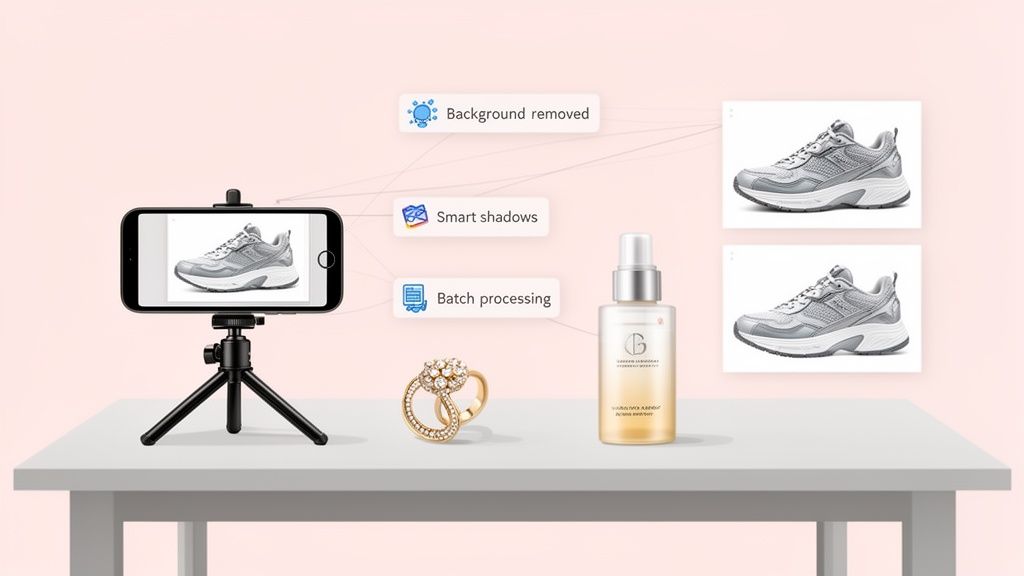
When you're hunting for the best photoshoot app, you’re really looking for a partner in your pocket. The goal is to find a tool that cleverly blends AI-powered editing, e-commerce-ready templates, and a super-simple interface to turn basic smartphone snaps into professional-grade product shots. Apps like ProdShot are built for this, automating tedious tasks like background removal, lighting fixes, and shadow effects, putting high-end results within reach for any seller.
Why Your Product Photos Define Your Brand

In e-commerce, your photos aren't just pictures. They’re your digital storefront, your 24/7 salesperson, and the first handshake with a new customer.
Long before anyone reads a single word of your carefully crafted product description, they've already made a snap judgment based on your images. That first visual hit is incredibly powerful, and it sets the stage for their entire shopping experience.
Sharp, consistent photography instantly signals professionalism and builds trust. It tells shoppers you’re a serious seller who sweats the details—in your products and in how you present them. That perception of quality is what lets you charge what you're worth and cut through the noise of a packed marketplace.
The Hidden Costs of Poor Imagery
Let’s be real: bad photos have a real business cost, and it’s one that often flies under the radar until it’s too late.
When your images are blurry, poorly lit, or all over the place stylistically, you’re putting obstacles in the customer’s path. A lack of visual clarity is a direct line to higher return rates. Why? Because the product that shows up on their doorstep doesn't match what they thought they were buying.
Worse yet, shoddy images kill buyer confidence and lead to abandoned carts. If a shopper can't make out the texture, see the scale, or examine the details, they're not going to risk their money. Every one of those abandoned carts is a lost sale.
In e-commerce, your images do the heavy lifting. They have to answer questions, crush objections, and spark desire in a matter of seconds. Neglecting them is like building a beautiful store but never cleaning the windows—nobody’s going to step inside.
Building Brand Trust Through Visuals
Consistency is everything. It's the bedrock of a solid brand identity. When every product in your catalog is shot with the same clean background, lighting, and angle, you create a cohesive, professional vibe. This visual harmony makes your store feel more reliable and curated, which encourages shoppers to stick around and see you as an expert in your niche.
This isn’t just a hunch; it’s backed by market trends. The global eCommerce product photography market is on track to more than double, hitting USD 2.33 billion by 2035. This explosion shows just how critical visuals have become to winning online. Investing in great imagery isn’t a "nice-to-have" anymore—it’s a non-negotiable part of growing your business.
This is where an AI-powered photoshoot app becomes a secret weapon. It levels the playing field, giving sellers the power to create stunning, brand-defining images without the old-school headaches and costs. If you want to see how the numbers stack up, check out our guide on the real cost of professional product photography.
Ultimately, the right app gives you full control over your brand’s story, smooths out the path to purchase, and builds the trust you need to not just survive, but thrive online.
What to Look for in a Modern Photoshoot App
When you're selling online, the right photo app isn't just a fun tool for filters—it's a critical piece of your business toolkit. The sheer number of photo editors out there can be dizzying, but for an e-commerce seller, the choice narrows down pretty quickly. You need something built for one purpose: selling products.
Forget about generic editors that make you manually trace products or spend ages fiddling with settings. A modern, AI-powered photoshoot app is basically an automated photo studio in your pocket. It's designed to do the heavy lifting, turning a quick smartphone snap into a clean, high-converting product shot in seconds.
AI-Powered Background Removal
This is the big one. For any e-commerce seller, flawless AI background removal is the single most important feature. Manually outlining a product with a digital lasso tool is a mind-numbing process that rarely gives you those perfectly clean edges you need. A top-tier app does this for you instantly and accurately.
Let's say you're listing a new line of handcrafted leather wallets. Instead of getting bogged down in complex desktop software, you just upload the photos. The AI cleanly lifts each wallet from whatever surface you shot it on. This isn't just about saving time; it's about creating that professional, consistent look across your entire store that builds instant trust with buyers.
A clean, consistent background is the foundation of professional product photography. It eliminates distractions and puts the focus squarely where it belongs—on your product. An app that masters this with AI is an invaluable asset.
This feature is the gateway to everything else. Once your product is perfectly isolated, you can pop it onto a pure white background for Amazon, a branded color for your Shopify store, or a dynamic lifestyle scene for social media.
Smart Shadow and Reflection Generation
A product just floating on a white background can look a bit… off. It feels flat and unnatural. This is where smart shadow and reflection generation comes in. It’s a subtle detail, but it makes a huge difference in adding realism and depth to your images.
The best apps don’t just slap a generic gray oval underneath your product. Their AI is smart enough to analyze your product's shape and lighting to create soft, believable shadows that make it feel grounded. For items like sunglasses, jewelry, or electronics, the ability to generate a subtle reflection adds a premium, high-end feel. That small touch can make your products seem far more tangible and valuable to a potential customer.
E-Commerce Ready Template Libraries
Why reinvent the wheel? A solid library of professionally designed templates is a total game-changer. These aren't just decorative frames; they are pre-built, optimized scenes for specific marketplaces and marketing channels.
A truly useful photoshoot app should give you templates for:
- Marketplace Compliance: Pre-sized canvases with pure white backgrounds perfect for Amazon and eBay's main image requirements.
- Social Media Posts: Eye-catching layouts designed for Instagram stories, Facebook ads, and Pinterest pins.
- Promotional Banners: Ready-to-go designs for sales, new arrivals, and holiday campaigns.
Picture this: you're prepping for a Black Friday sale. Instead of hiring a designer, you just drop your product into a slick "Sale" template with bold text and festive graphics. Boom. Done. Your marketing visuals are professional and cohesive. And when you're thinking about different ways to present your products, remember that the best collage app for Instagram photos can also be a powerful tool for visual storytelling in your e-commerce strategy.
Before we move on, let's break down the key differences between a dedicated AI photoshoot app and a standard photo editor. It's easy to see where the real value lies for an online seller.
Essential Photoshoot App Feature Checklist
| Feature | Importance for E-Commerce | Found in AI Photoshoot Apps (like ProdShot) | Found in Basic Editors |
|---|---|---|---|
| AI Background Removal | Critical. The foundation for clean, consistent listings. | ✅ Yes (Instant & Automatic) | ❌ No (Requires manual selection) |
| Smart Shadow Generation | High. Adds realism and perceived value. | ✅ Yes (AI-generated) | ❌ No (Manual and difficult) |
| Reflection Generation | Medium-High. Crucial for glossy or metallic items. | ✅ Yes (Realistic AI reflections) | ❌ No |
| E-commerce Templates | High. Saves time on marketing and listing visuals. | ✅ Yes (Marketplace & social media optimized) | ❌ No (Generic filters/frames only) |
| Batch Processing | Critical. Essential for editing multiple products at once. | ✅ Yes | ❌ No (Typically one-by-one) |
| Lifestyle Backgrounds | High. Creates context and boosts engagement. | ✅ Yes (AI-generated scenes) | ❌ No |
This table really highlights the gap. A basic editor just gives you tools; an AI photoshoot app gives you a complete, automated workflow designed specifically for selling.
Batch Processing and Workflow Automation
Time is money, especially when you're managing dozens or hundreds of SKUs. Batch processing is a non-negotiable feature that lets you apply the same edit—like removing a background or applying a template—to a whole bunch of images at the same time.
Imagine launching a new jewelry collection with 50 unique pieces. Instead of slogging through each photo one by one, you can upload the entire set, apply a consistent white background and shadow effect, and export them all in a matter of minutes. This feature alone can give you back hours of your week, freeing you up to focus on what actually grows your business: marketing and sales. A modern app should simplify your entire process, from snap to sale.
Your Workflow for Flawless Product Shots
Getting a simple smartphone photo to look like a high-converting product shot might seem like a dark art, but it really just comes down to a clear, repeatable workflow. You don't need a fancy camera or expensive lighting gear. What you do need is a smart process that starts with a decent source photo and ends with an efficient editing tool.
Honestly, the secret is getting the basics right before you even tap the shutter button. When you give an AI tool a good, clean image to start with, you'll always get a much better result. A few small tweaks during the shooting phase can save you a mountain of headaches later.
Setting Up Your Smartphone Shot
Before you take a single picture, spend two minutes setting up your mini "studio." This sounds way more complicated than it is—a clean tabletop next to a window is usually all it takes.
- Find good light. Natural light is your best friend here. Put your product near a big window, but try to avoid direct, harsh sunlight that creates ugly, distracting shadows. An overcast day is actually perfect because the clouds act like a massive, free softbox.
- Use a simple background. Grab a large sheet of plain white paper or a poster board and place your product on it. This clean backdrop makes it incredibly easy for an AI to isolate your product later on.
- Keep your phone steady. Even a tiny bit of handshake will introduce blur. You can prop your phone up against a stack of books or use a cheap little tripod to make sure every shot is perfectly crisp.
Once you’re set, take pictures from a few different angles. Get the front, back, and side, plus a couple of detailed close-ups. This gives you options and shows your customers everything they need to see to feel confident about buying.
A great final image is a team effort between your initial photo and a powerful AI. When you feed the AI a clear, well-lit source image, you're setting it up to deliver professional, realistic results every single time.
Transforming Your Photo with an AI App
Okay, this is where the real fun begins. With a solid source photo ready to go, a tool like ProdShot handles all the technical heavy lifting. The whole process is designed to be fast, easy, and requires zero design skills. You're not just editing a photo; you're creating a complete, sales-ready visual in minutes.
The core idea behind a modern photoshoot app is pretty simple.

As you can see, a powerful workflow is all about combining AI enhancement, batch editing features, and easy exporting. These are the three pillars of efficient e-commerce photography today.
Let’s walk through what this looks like in the real world.
Step 1: Upload and Let the AI Do Its Thing
First, you just upload your smartphone photo into the app. The second it’s uploaded, the AI gets to work. It instantly identifies your product and performs a perfect background removal. This one step used to be a tedious manual task, but now it’s completely automated.
Step 2: Pick a Professional Scene
With your product cleanly cut out, you can now drop it into a totally new environment. This is where you go beyond the boring white background and start creating lifestyle images that actually sell. The app will generate dozens of scenes for you.
You could pick:
- A minimalist studio scene with ultra-realistic shadows and reflections.
- A vibrant lifestyle setting that shows your product in action.
- A themed template for a sale, like a "Black Friday" banner.
This is the creative part of the process. You're essentially directing a virtual photoshoot. If you sell skincare, you can place your serum bottle on a clean marble countertop. If you make jewelry, you can display a necklace on a plush velvet stand.
Step 3: Fine-Tune and Export
Once you've found a scene you love, you can make a few final adjustments. Maybe you want to tweak the shadow intensity, nudge the product over a bit, or add some custom text. The best apps give you simple controls for these final touches.
When it looks perfect, you export the image in whatever format you need. Need a square shot for Instagram? A high-res image for your Shopify banner? An Amazon-compliant photo with a pure white background? It just takes a few clicks.
This entire workflow—from a basic phone picture to a polished, marketplace-ready shot—can be done in less than two minutes. By combining a little prep work with powerful AI, you can crank out an endless supply of professional product photos, giving your brand the consistent, high-end look it needs to stand out.
Getting Your Images Right for Amazon and Shopify
A killer product photo is a great start, but it's not the finish line. If your image doesn't play by the very specific rules of the marketplace you're selling on, it can get rejected, buried in search results, or just plain fail to convince shoppers to click "buy."
This is especially true for huge platforms like Amazon and Shopify. Each has its own playbook for what makes a good product photo, and what works on one might get you in trouble on the other. This is where a good photoshoot app becomes your secret weapon, letting you create perfect, compliant images for every sales channel without tearing your hair out.
Amazon: The King of Clean and Compliant
Amazon's main goal is to create a consistent, no-nonsense shopping experience. Their image rules are notoriously strict because they want every product page to look and feel similar, making it dead simple for customers to compare items.
When it comes to your main "hero" image, there's zero wiggle room.
- Pure White Background: This is the big one. Your main image must sit on a pure white background (that's RGB 255, 255, 255). No exceptions, no light gray, no off-white. This is probably the #1 reason product images get rejected.
- Fill the Frame: The product itself needs to take up at least 85% of the image area. They want customers to see your product clearly, not a tiny speck in a sea of white.
- Zoom-Ready Size: Your image needs to be at least 1000 pixels on its longest side. This activates Amazon's zoom feature, which is a massive conversion driver. Shoppers love to get a closer look.
Once you get past the hero shot, you have more room to play. Your secondary images are where you can show off lifestyle photos, infographics, and close-ups of key features. But that first image is your digital handshake with the customer—it has to be perfect.
Think of Amazon's main image requirement as a uniform. Every product wears the same clean, white outfit so that shoppers can focus solely on the product's features, not on flashy or distracting backgrounds.
Shopify: Your Brand, Your Rules
Shopify is your turf, which means you have total creative freedom. While you still need to think about things like page load speed, the style of your photography is completely in your hands. This is your chance to build a real brand identity.
Forget the mandatory white background. On Shopify, you can use a color palette that screams your brand. Maybe you sell earthy, organic skincare and use soft, natural tones. Or perhaps you sell sleek tech gadgets and opt for a moody, dark aesthetic. The key is consistency, but it's a consistency that you define. A powerful Shopify photo editor can be a huge help in crafting a look that makes your store unforgettable.
The aim on Shopify is to pull customers into your world. You can mix and match clean studio shots with rich lifestyle photos that show your products being used and loved. This helps shoppers imagine your products in their own lives, which is a powerful step toward making a sale.
How a Photoshoot App Bridges the Gap
Trying to manually edit photos for each platform's unique rules is a recipe for frustration and wasted hours. A modern photoshoot app completely changes the game.
The best apps come loaded with presets and canvas sizes built specifically for the big players in e-commerce.
- One-Tap Templates: You can take a single photo and, with just a few clicks, instantly generate an Amazon-compliant version with a perfect white background.
- Custom Backgrounds: In that same session, you can then drop the same product onto a branded, colored background, maybe add a little text, and export it for your Shopify homepage.
- Automatic Resizing: The app takes care of all the boring technical stuff—pixels, aspect ratios, file sizes—ensuring every image is perfectly optimized for the platform it's destined for.
And once you've got the perfect shots, don't forget the final step. Knowing how to optimize images for web performance is crucial. Nobody waits for slow-loading pictures.
Ultimately, getting your images right isn't just about avoiding rejections. It's about speaking the native visual language of each platform to build trust and, most importantly, drive sales. With the right tools, it's a whole lot easier than it sounds.
It’s one thing to read about features like AI background removal and smart shadows. It’s another thing entirely to see what they can do for a real business. The true value of a great photoshoot app isn’t just in the technology; it's in the way it can completely overhaul a brand's image.
Let’s follow the journey of a fictional online seller, "The Gilded Fern," to see how this plays out in the real world.

Our seller, Alex, creates gorgeous handmade jewelry. The pieces themselves are stunning, but the product photos? Not so much. They were shot on a kitchen table with a smartphone, resulting in inconsistent, poorly lit images cluttered with distracting backgrounds. This disconnect between the quality of the product and its presentation was costing Alex sales. Big time.
The “Before” State: A Familiar Struggle
Alex's initial product catalog was a classic case of a passionate creator hitting the visual wall of e-commerce. Sound familiar?
- Inconsistent Backgrounds: One necklace might be on a wooden table, another on a wrinkled piece of fabric. The result was a messy, unprofessional storefront that lacked cohesion.
- Poor Lighting: Harsh overhead lights created glare on the metal and deep, unflattering shadows that hid the delicate details of the gemstones.
- Lack of Realism: The photos just felt flat. They failed to capture the true texture, weight, or premium feel of the jewelry, making it tough for shoppers to really connect with the products.
This led to high bounce rates and a cart abandonment rate that was, frankly, alarming. Shoppers didn't trust the visuals enough to pull the trigger. Alex was sinking hours into a basic photo editor, a frustrating cycle that only produced mediocre results.
The AI-Powered Transformation
Fed up, Alex decided to give an AI-powered tool like ProdShot a try. The goal was to overhaul the entire catalog without breaking the bank on a professional photographer. The process was surprisingly simple, focusing on the features that would make the biggest splash.
First, Alex uploaded the existing smartphone photos. The AI background removal feature instantly lifted each piece of jewelry from its cluttered backdrop, placing it on a clean digital canvas. That single step brought immediate consistency to the entire collection.
Next came the smart shadow and reflection tools. The AI analyzed the shape and material of each item, adding soft, realistic shadows that made the jewelry look grounded and tangible. For a pair of silver earrings, it even added a subtle, polished reflection that screamed luxury.
The difference between a product floating in space and one grounded with a realistic shadow is the difference between an amateur listing and a professional one. It’s a small detail that has a massive psychological impact on buyer trust.
Finally, Alex played around with AI-generated scenes. Instead of a plain white background for every shot, some pieces were placed on virtual marble slabs or elegant velvet displays. This created a fantastic mix of clean, marketplace-compliant images and compelling lifestyle shots perfect for social media.
The “After” State: Real, Measurable Results
The change in The Gilded Fern's storefront was night and day. The new product catalog was clean, uniform, and looked utterly professional. More importantly, this visual upgrade translated directly into real business results.
This isn't just wishful thinking. The data backs it up. Studies have shown that high-quality product photos can achieve 94% higher conversion rates. Businesses using AI for image creation have seen sales jump by up to 25%. In some cases, a killer visual strategy can even lead to a 3X boost in conversions. For sellers like Alex, these aren't just numbers—they represent the shift from struggling to thriving.
Within a month, Alex saw a huge lift in conversions and a steep drop in cart abandonment. The time saved on photo editing—slashed from hours per product to mere minutes—was reallocated to marketing and customer service. This story isn't a one-off; it’s a repeatable outcome for any seller who adopts the right tools. By using an AI product photo generator, you're not just making better pictures; you're building a stronger, more profitable brand.
Common Questions About E-Commerce Photo Apps
Deciding to bring any new tool into your workflow is a big deal, and that goes double for something as critical as your product photography. You want to be sure you're making the right call.
Let's walk through some of the most common questions and hesitations that pop up when sellers are looking for the right photoshoot app. My goal here is to give you clear, straightforward answers so you can feel confident you’re getting a real asset for your business, not just another piece of software.
Do I Really Need a Professional Camera to Get Started?
Nope. Absolutely not.
Honestly, this is one of the biggest myths that modern photo apps have completely busted. The whole point of these tools is to take the everyday photos from your smartphone and elevate them to studio-grade quality.
The AI is built from the ground up to work with mobile images. It understands how to correct for common smartphone camera quirks, enhance lighting, and deliver that polished, professional look without you needing a single piece of expensive gear.
How Is This Different from a Regular Photo Editor?
Think of it this way: a standard photo editor like Photoshop is like being handed a toolbox full of professional-grade tools. You get all the brushes, layers, and selection tools you could ever want, but the final result depends entirely on your own skill and artistic eye.
An AI photoshoot app is the expert carpenter who already knows how to use all those tools. It automates the expertise. You just provide the raw material—your phone photo—and the AI instantly applies proven best practices for creating e-commerce visuals that actually convert.
A standard editor is a toolbox; an AI photoshoot app is the professional you hire to get the job done right, but in seconds and for a fraction of the cost. It’s about results, not just tools.
Can These Apps Create Amazon-Compliant Images?
Yes, and this is a crucial feature that separates the good apps from the great ones. The best photoshoot apps come with built-in templates and presets specifically designed for major marketplaces like Amazon.
This means you can effortlessly generate images that meet Amazon's notoriously strict guidelines, including:
- A pure white background (RGB 255, 255, 255) to avoid those dreaded listing rejections.
- The right sizing and resolution to make sure the all-important zoom feature works perfectly.
- Proper aspect ratios that look sharp and professional on the product detail page.
Getting this right saves a massive amount of time and headaches, helping you maintain a trustworthy storefront on the world's biggest marketplace.
Is It Cheaper Than Hiring a Photographer?
For almost every online seller, the answer is a resounding yes. This is especially true if you’re frequently adding new products or need a steady stream of fresh marketing visuals. A single professional photoshoot can easily run you hundreds, if not thousands, of dollars.
An app subscription, on the other hand, gives you the power to create a virtually unlimited number of high-quality images for a small monthly fee. When you factor in the time saved and the direct impact on your sales, the return on investment is a no-brainer. It effectively democratizes professional product photography, making it accessible to any business, no matter the size.
Ready to transform your product photos and see the results for yourself? ProdShot gives you all the AI-powered tools you need to create stunning, sales-driving images in minutes. Start your free trial today and see the difference.