

In the bustling world of e-commerce, the quality of your product photos can make or break your business. Entrepreneurs and sellers must decide between two main methods for product photo editing: traditional do-it-yourself (DIY) techniques and the cutting-edge capabilities of artificial intelligence (AI). This guide delves into the nuances of each approach to help you determine the best choice for your e-commerce needs.
Understanding the Value of High-Quality Product Photos
Professional product images are pivotal in shaping the perceived value of your offerings. They build trust with potential buyers and significantly impact conversion rates. Research by Shopify reveals that products with high-quality images are 40% more likely to be shared on social media, boosting visibility and, consequently, sales.
DIY Product Photo Editing
Pros of DIY Editing
- Complete Control: DIY editing empowers you with complete control over the entire process, allowing custom adjustments to align with your brand's unique aesthetic.
- Economical for Experts: For those skilled in editing, DIY methods can be cost-effective, eliminating the need for outside services.
Practical Example
Consider an artisan jewelry brand that needs to emphasize intricate details and custom crafted designs. DIY editing allows for meticulous, detailed adjustments that meet these specific needs.
Cons of DIY Editing
- Time-Intensive: With tasks like background removal or color correction taking several minutes per image, DIY editing demands a significant time investment.
- Skill Requirements: Proficiency in software such as Adobe Photoshop or GIMP is essential to achieve professional results, which can be a barrier for beginners.
Mistakes to Avoid
Avoid overwriting the original image files during editing. Always keep a backup to return to if the edits do not go as planned.
AI-Powered Product Photo Editing
Pros of AI Editing
- Efficiency and Speed: AI tools automate tasks like background removal, object removal, and color correction within seconds. For instance, AI background removal takes just 5-10 seconds per image.
- User-Friendly: Many AI platforms boast intuitive interfaces, making them accessible even to individuals without extensive editing experience.
Practical Example
A fashion retailer with an extensive catalog can harness AI's batch processing capabilities to edit hundreds of images efficiently, saving time while maintaining quality.
Cons of AI Editing
- Limited Customization: While convenient, AI tools may lack the creative flexibility needed for certain intricate edits.
- Variable Quality: The outcome can vary based on image complexity and the specific AI tool used.
Mistakes to Avoid
Select AI tools that specifically cater to the type of images you're working with to ensure optimal results.
Cost Comparison: DIY vs AI Editing
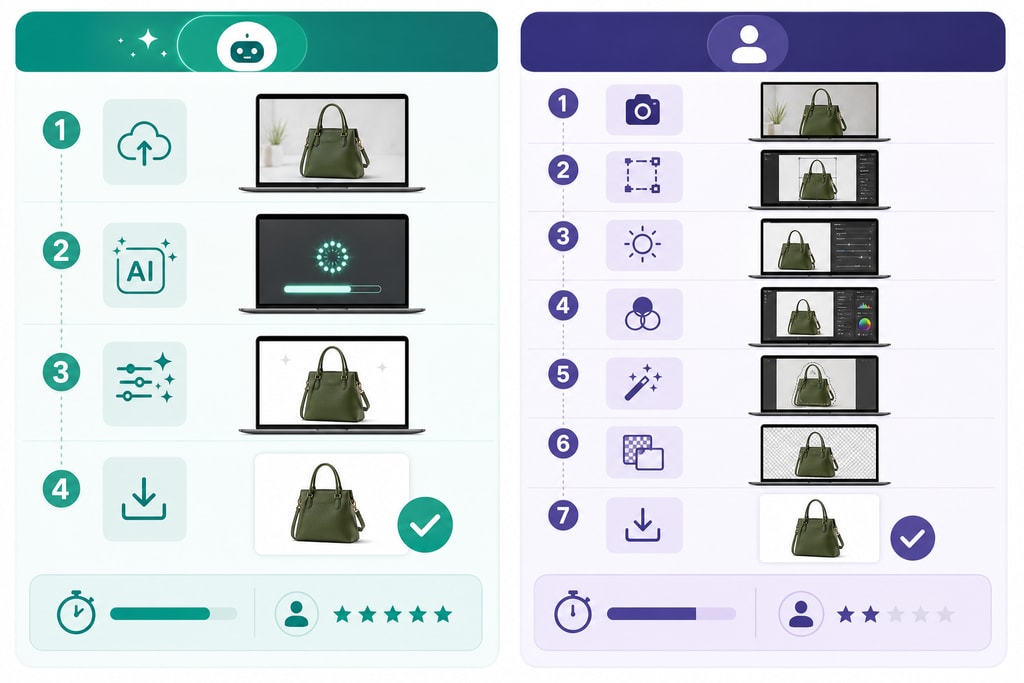
| Aspect | DIY Editing | AI Editing | |————————|———————————————————————|————————————————————————| | Software Costs | Free (GIMP) to $22.99/month (Photoshop) | Free trials available; paid plans range from $6.90 to $50/month | | Time Investment | ~10 minutes per image; 100 images = ~17 hours | ~5 seconds per image; 100 images = ~8 minutes | | Skill Level Needed | High; requires proficiency in software | Low; designed for ease without prior experience |
For more tools to enhance your product photos, check out ProdShot's free tools.
Deciding When to DIY
- Customization Needs: If your images require distinct edits that AI cannot accommodate, manual editing is the way to go.
- Budget Constraints: With existing skills and software, DIY is more budget-friendly.
Opting for AI Editing
- Large Catalogs: AI is ideal for businesses needing efficient editing for numerous images.
- Limited Skills: If novice-friendly solutions are preferred, AI tools streamline achieving professional results.
A Hybrid Approach: Leveraging Both DIY and AI
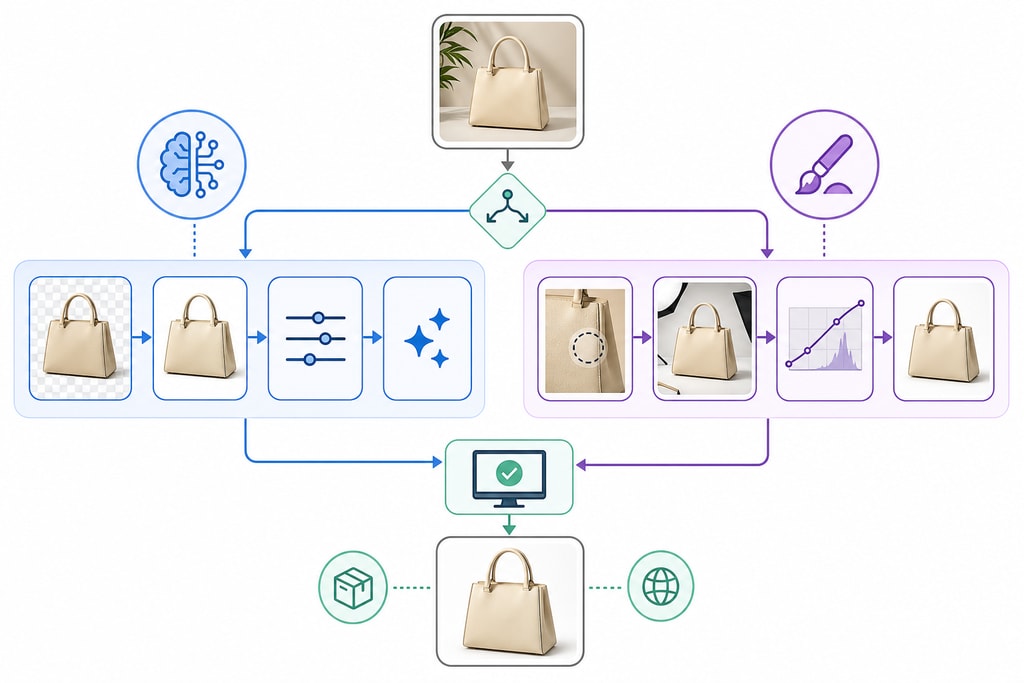
Many businesses thrive using a hybrid model where AI handles routine edits and manual methods tackle complex adjustments. This strategy combines AI's efficiency with the creative control of DIY editing.
Discover how to enhance your own product photos with ProdShot's innovative tools.
FAQs
Q: Can AI editing match the quality of professional manual editing? A: For standard tasks, AI editing can yield results comparable to manual efforts. However, for detailed or creative edits, manual skills still hold an edge.
Q: Are AI editing tools expensive? A: Many AI editing platforms offer free trials or cost-effective subscription plans, catering to businesses of varying sizes.
Q: How difficult is it to learn AI editing tools? A: AI platforms usually have user-friendly interfaces, offering a significantly easier learning curve than traditional software.
Q: Can I combine AI and manual editing? A: Absolutely! Many businesses use AI for routine edits and manual editing for personalized adjustments.
Conclusion
The decision between DIY and AI product photo editing depends on your specific needs, available resources, and expertise. AI tools typically offer a balance of efficiency and quality, optimizing the editing process without sacrificing professionalism. Platforms like ProdShot provide AI-powered solutions designed for e-commerce, helping you produce stunning product images effortlessly.