

Introduction
In the dynamic world of e-commerce, having an updated and visually appealing product catalog is pivotal. Manually editing each photo can be daunting, leading to wasted time and potential inconsistencies. Enter batch processing — a powerful solution that automates the editing of numerous images simultaneously, offering efficiency and uniformity across all your product shots.
Understanding Batch Processing in Product Photography
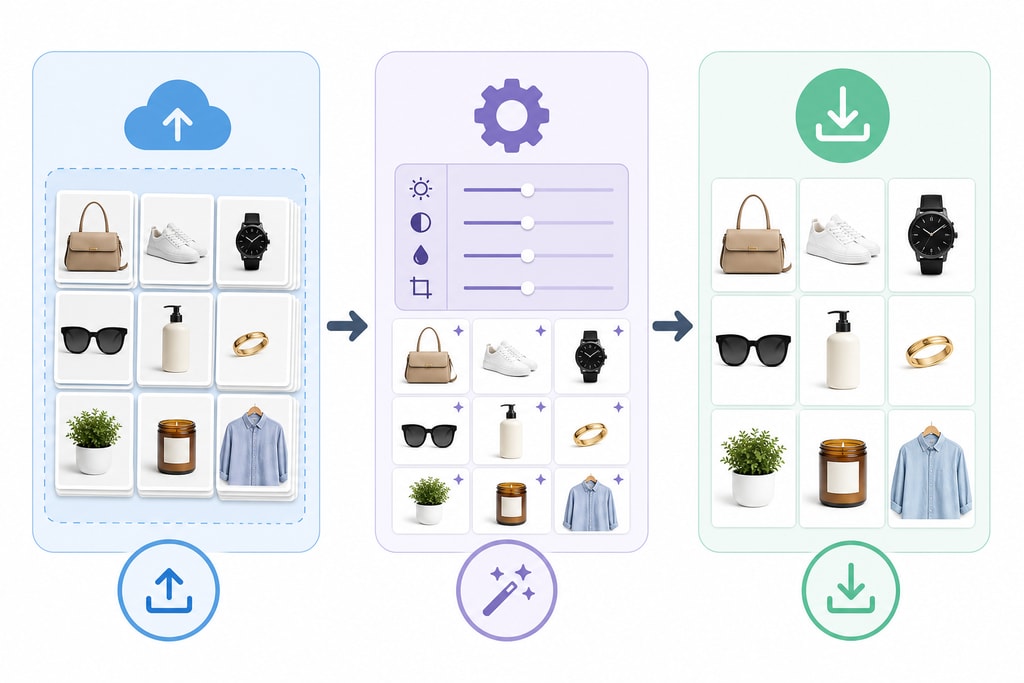
Batch processing, in essence, refers to the automation of applying consistent edits to multiple images at once. For e-commerce businesses that need to update large catalogs regularly, this method proves crucial.
Benefits of Batch Processing
- Time Efficiency: By automating repetitive editing tasks, you significantly cut down the hours spent on manual adjustments. Tools like CleanPic can handle up to 50 images at a time, making them invaluable for frequent updates, such as those on Etsy. (cleanpic.io)
- Consistency: Achieve a cohesive look across your catalog, boosting brand identity and fostering customer trust.
- Scalability: Adapt easily to growing inventory and seasonal demands. The ability to process a large volume of images simultaneously is a game-changer.
Preparing for Batch Processing
Proper groundwork is critical to maximizing the benefits of batch processing.
Organizing Your Files
- Consistent Naming Conventions: Utilize descriptive filenames (e.g.,
product-sku-angle.jpg) to streamline identification and management.
- Folder Structure: Sort images into categories aligning with product types or editing requirements to enhance workflow efficiency.
Image Quality Considerations
- Resolution: Use high-resolution images to maintain quality post-processing.
- Lighting and Background: Opt for consistent lighting and neutral backgrounds to ensure uniformity across edits.
Implementing Batch Processing Techniques
Various tools offer batch processing capabilities, each with unique features tailored for e-commerce.
Utilizing AI-Powered Tools
- ProdShot: With our platform, upload multiple images and automate the creation of professional, marketplace-ready photos. Features like AI Model Shoot are perfect for generating high-quality fashion visuals without the studio. (prodshot.net)
- On-Model: Designed for high-volume fashion imaging, On-Model can process thousands of photos daily, with real-time monitoring and organization tools. (on-model.com)
Step-by-Step Guide to Batch Processing with ProdShot
- Upload Images: Batch upload product photos to the ProdShot platform.
- Select Processing Options: Choose edits like background removal, color correction, or style overlays.
- Apply Edits: Let the AI apply your selected edits uniformly across all images.
- Review and Download: Check processed images, make necessary tweaks, and download the final results.
Best Practices for Effective Batch Processing
To leverage batch processing fully, adhere to these best practices:
- Test with a Small Batch: Process a small sample initially to ensure satisfaction with edit outcomes.
- Maintain Backup Copies: Consistently backup original images to safeguard against data loss.
- Regularly Update Processing Settings: Adapt settings to align with evolving brand styles and standards.
Common Challenges and Solutions
While beneficial, batch processing may present challenges:
- Inconsistent Results: Variability in original image quality can lead to diverse outputs. Solution: Standardize your photography setup.
- Overprocessing: Excessive edits may degrade quality. Solution: Be moderate with edits and review outputs carefully.
Practical Examples and Decision Criteria
Implementing batch processing involves critical choices. Here’s how to decide what's best for your needs:
- Example Scenario: You manage a clothing store needing seasonal catalog updates. Using ProdShot’s AI tools, you can batch process new collections swiftly, ensuring all products align with your brand’s aesthetic.
- Decision Criteria:
- Volume Needs: High turnover or frequent catalog updates imply a need for robust batch processing capabilities.
- Tool Compatibility and Integration: Ensure your chosen tool integrates smoothly with existing platforms.
- Feature Requirements: Prioritize tools offering essential features like AI-based background removal.
Mistakes to Avoid
- Ignoring Image Quality: Always start with high-quality photos. Batch processing can't correct low-resolution images.
- Neglecting Review Steps: Skipping post-process reviews can lead to overlooked errors.
- Underestimating Complexity: Complex edits might require initial manual adjustments before batch processing.
FAQ
Q: Can batch processing handle different product types simultaneously?
A: Yes, but grouping similar product types yields more consistent results.
Q: Is batch processing suitable for all e-commerce platforms?
A: It should work for most, but verify your platform's compatibility.
Q: How does batch processing impact SEO?
A: Consistently high-quality images improve user experience, which can enhance SEO rankings.
Q: What are the main cost considerations?
A: Costs vary by tool, but time saved on manual edits often outweighs the investment.
Sources and Further Reading
- Batch Processing at Scale – On-Model
- Batch Processing Product Photos: How to Remove Backgrounds from 100+ Images – NSS Background Remover Blog
- Batch Create: Make 1000 Product Photos at Once – ProdShot
Conclusion
Adopting batch processing for product photos enhances efficiency, consistency, and scalability in managing your e-commerce catalog. With advanced tools like ProdShot, quick and professional image transformations allow you to focus more on expanding your business.
Ready to streamline your product photography? Explore how to create product photos with ProdShot today and experience the transformation.
For those needing to rethink inventory strategies, try our Batch Catalog Refresh Calculator.