
Introduction
In the highly competitive world of Etsy, first impressions are everything. With millions of unique products vying for consumer attention, professional-quality product photography is crucial. According to insights from Rewarx, listings with high-quality images see significant sales increases. However, not all sellers have the budget or access to professional photography equipment. AI-powered photography tools offer an innovative, cost-effective solution to enhance your product images, making them more appealing and professional.
The Impact of Quality Product Photography
Why Photography Matters
Purchasing decisions are often influenced by visual appeal. Shoppers on Etsy rely heavily on photos to assess a product's quality and appeal. High-quality images build trust and convey professionalism, crucial factors in convincing potential buyers to click 'add to cart.' Conversely, poor-quality photos can deter customers, reducing sales and damaging shop credibility.
Building Trust with Visuals
Images are your virtual storefront. They communicate value, detail, and reliability. Consistency in style and presentation reinforces brand identity and customer trust, leading to increased repeat purchases.
How AI Enhances Etsy Product Photos
Artificial intelligence has taken product photography to the next level by automating enhancements and ensuring consistency. Here's how AI can elevate your Etsy listings:
Background Removal and Replacement
AI tools seamlessly remove distracting backgrounds, replacing them with clean, professional ones. This ensures that your products remain the central focus, crucial for maintaining consistency across your listings.
Lighting and Color Correction
AI algorithms can optimize lighting and correct colors, ensuring your products appear vibrant and true to life, regardless of original photo conditions. This allows even amateur photos to look professional.
Lifestyle Scene Generation

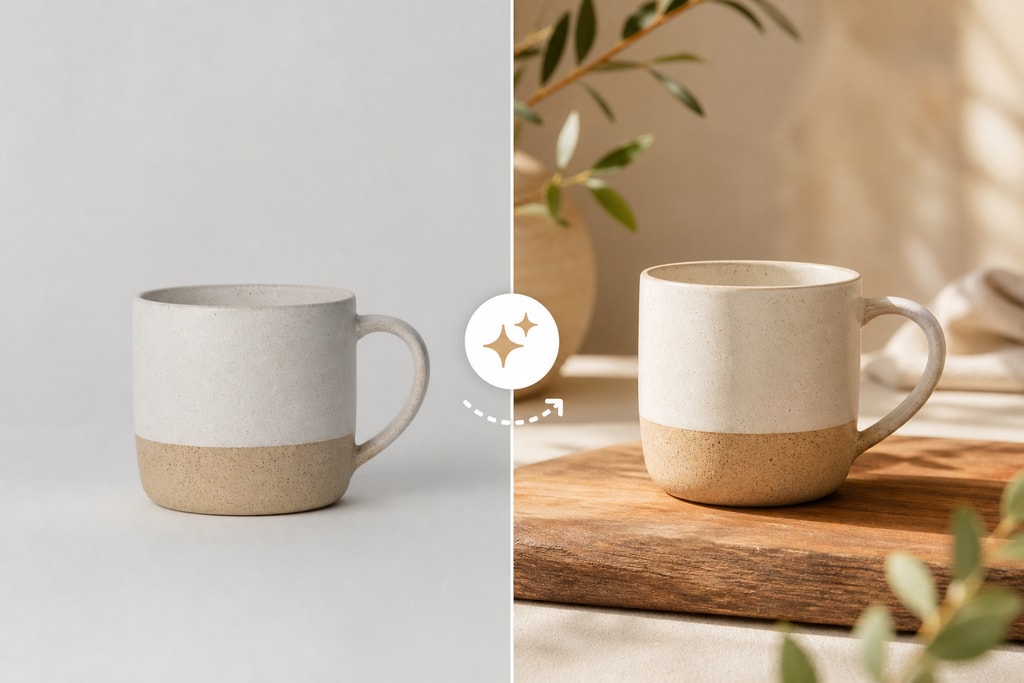
AI can place products into realistic lifestyle scenes, helping customers visualize usage in real life. This technique increases engagement and conversion rates, a fact confirmed by studies such as Rewarx).
Batch Processing
With AI, managing large inventories becomes feasible as it allows batch processing, enabling multiple photo edits at once, saving time and ensuring uniformity across listings.
Top AI Photography Tools for Etsy Sellers
Picsy
Easily transforming ordinary photos into studio-quality images, Picsy offers styles such as editorial and lifestyle, delivering high-resolution images swiftly. Its user-friendly design makes it accessible without requiring photography expertise. Explore Picsy here.
Hauld
Hauld excels in creating unique, AI-rendered scenes that make listings stand out. With a flexible pay-per-use model, it's ideal for sellers avoiding long-term subscriptions. Learn more about Hauld.
Avriro
Perfect for fashion and accessory sellers, Avriro's suite includes background removal and virtual try-on features. It helps showcase products on AI-generated models. Visit Avriro.
Photoroom
Known for AI-powered background removals and scene placement, Photoroom is popular among Etsy sellers due to its intuitive interface. Check out Photoroom.
Implementing AI Photography in Your Etsy Workflow
Step-by-Step Guide
- Select an AI Photography Tool: Choose based on budget and specific needs. Consider exploring ProdShot for tailored solutions.
- Upload Your Product Photos: High-resolution images from multiple angles provide ample data for AI enhancements.
- Choose Desired Enhancements: Select background styles and lighting adjustments. Explore additional features like lifestyle scene placement.
- Review and Edit: Post-processing, ensure the images meet quality standards. Use manual adjustments if needed.
- Update Your Listings: Replace old photos with enhanced ones, ensuring compliance with Etsy's image guidelines.
Practical Examples and Considerations

Before and After
Consider a simple mug photo. After AI enhancement, the mug stands against a minimalist, distraction-free background with optimized color balance, transforming its appeal.
Mistakes to Avoid
- Over-editing: Strive for authenticity; overly enhanced images can mislead and cause dissatisfaction.
- Ignoring Consistency: Variations in lighting and background across images can break the professional aesthetic.
Common Questions
Are AI-generated photos allowed on Etsy?
Yes, as long as they accurately represent the product and adhere to Etsy's policies. Always ensure authenticity in your imagery.
Do I need technical skills to use AI photography tools?
No, these tools feature user-friendly interfaces ideal for non-technical users. However, basic knowledge of photography principles can enhance effectiveness.
Can AI tools handle all types of products?
While generally versatile, some tools may preferentially enhance certain product types. Experiment with multiple tools to find the best fit for your inventory.
Conclusion
AI photography is a game-changer for Etsy sellers, offering a powerful avenue to enhance product listings, attract buyers, and drive sales. By integrating these tools into your workflow, you can ensure professional quality images without prohibitive costs or effort. For seamless creation of professional product photos, consider utilizing ProdShot, an AI-driven service tailored for e-commerce success.
Additional Resources
Explore our Etsy listing photo checklist to ensure your images are optimized for maximum impact.